One real workbook, from formulas to a verified system.
Every step below happened when this page was built, on the same example workbook you can open at /try. The numbers are the product’s output, not ours.
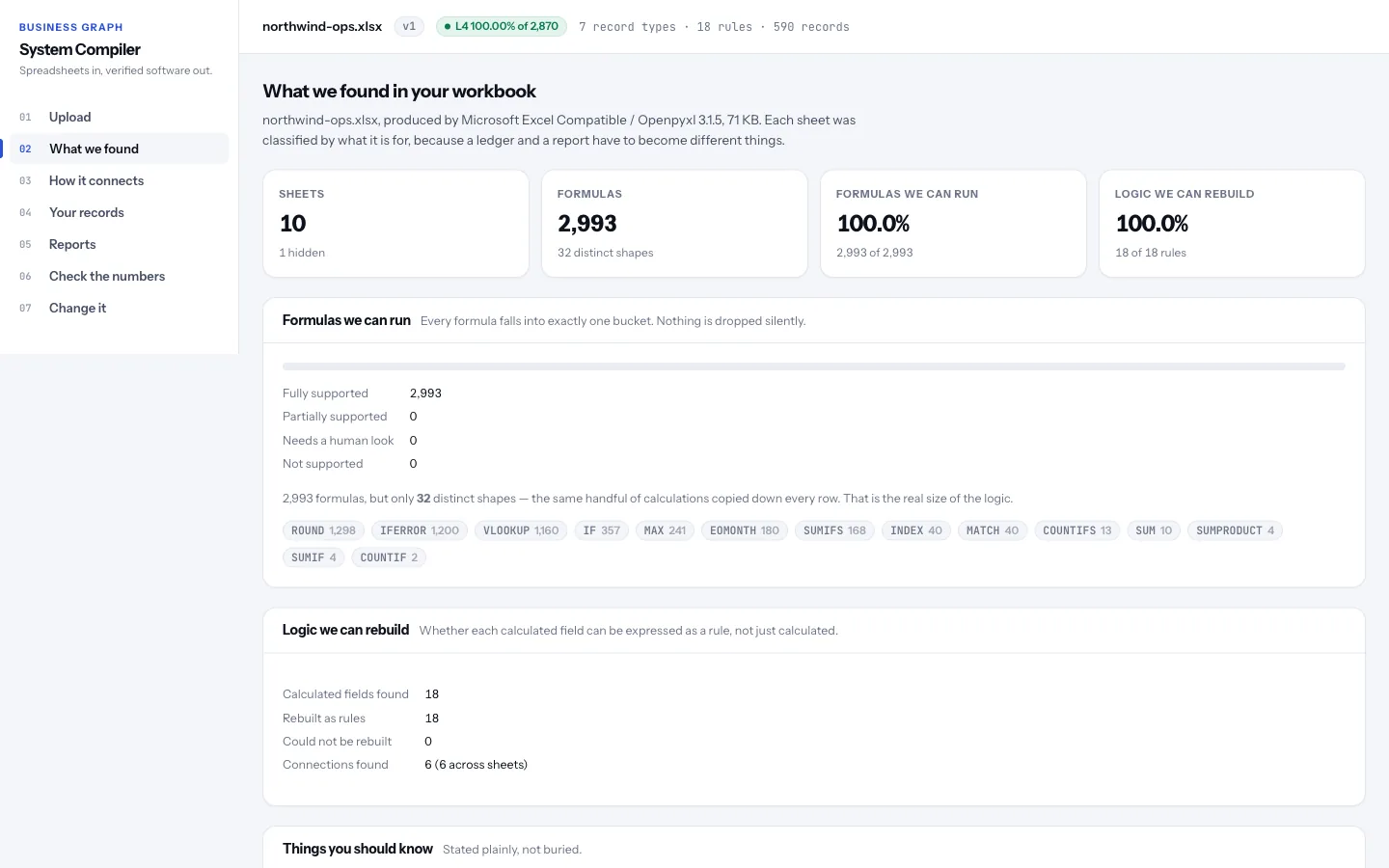
Understand what the workbook is for.
Tavuni reads the file’s own parts — formulas, the values Excel stored for them, named ranges, tables, hidden sheets — and works out what each sheet is: a ledger of records, a lookup table, a settings tab, a report. It is given no knowledge of this workbook.
10 sheets (1 hidden), 2,993 formulas, 2,993 of them supported by the formula engine.
Build the Business Graph.
7 record types, 6 relationships — each relationship found from the lookup formulas that already join the sheets, with its evidence and confidence kept.
The 6 relationships as a list
Customer.segment→PricingRuleUplift.segmentCustomer.country→TaxRate.countryOrder.customerId→Customer.customerIdOrderLine.orderId→Order.orderIdOrder.shipCountry→TaxRate.countryOrderLine.sku→Product.sku
Turn formulas into rules about the business.
18 calculated fields, each compiled from thousands of copied-down cells into one rule that names entities and fields. The original formula stays beside it, so any number traces back to the cell it came from.
More on the model- Excel
- =SUMIFS(OrderLines!$H$4:$H$383,OrderLines!$B$4:$B$383,A4)
- Rule
- SUM(OrderLine.lineTotal WHERE OrderLine.orderId = Order.orderId)
- Excel
- =IFERROR(VLOOKUP(E4,TaxRates!$A$4:$B$9,2,FALSE),DefaultTaxRate)
- Rule
- IFERROR(LOOKUP(TaxRate WHERE TaxRate.country = Order.shipCountry).taxRate, Setting.DefaultTaxRate)
- Excel
- =IF(D4="Cancelled",0,MAX(FreightMinimum,ROUND(I4*FreightRate,2)))
- Rule
- IF(Order.status = "Cancelled", 0, MAX(Setting.FreightMinimum, ROUND(Order.netAmount * Setting.FreightRate, 2)))
Check two ways — and show every difference.
The formula engine: 2,993 formulas recalculated and compared with the values the workbook stored — 2,992 exact, 1 on a rounding boundary, 0 different.
The generated system: the Business Graph run over 590 extracted records with calculated fields blanked, so the engine must derive every one. No cell addresses are involved — a wrong entity boundary, field mapping or relationship would show up here.
The expected values in this example workbook were computed by an independent, third-party Python formula engine — a different language and a different author — so the check is not the product grading itself.
- Values checked
- 2,870
- Matched
- 2,869
- Rounding edge
- 1
- Different
- 0
The generated system, run on 590 records with every calculated field blanked first, agrees with the workbook’s own stored results on 100.00% of values. The one value sitting exactly on a rounding midpoint is reported separately, never folded into the pass rate.
Change it, safely.
A plain-language request becomes operations on the model, is validated, applied to a copy, run against the real records and shown as a diff. Only a person can publish it as the next version.
In this public example the proposal comes from deterministic code (local-heuristic (rule-based-v1)); no language model is called.
Safe change in detail- 1 · Request
Add a manager approval when order value exceeds $10,000.
- 2 · ProposalRequire Manager approval for orders over $10,000Assumptions it states, so a person can disagree:
- The threshold applies to Order.orderTotal (Order Total).
- Reusing the existing "Manager" role.
- The comparison is strictly greater than the threshold.
- 3 · Diff
- addedAdded rule "Orders over $10,000 need Manager approval": Order.orderTotal > 10000money or approvals
- addedAdded process "Order approval" with 4 stepsmoney or approvals
- 4 · Effect on real records89 of 120 Orders records (74.2%) would be affected.Combined order total of the affected records: $3,566,077.
- 5 · A person decidesThe assistant cannot publish. A person approves — and the change becomes version 2, with its author recorded — or discards it.
The same model runs the platform.
Beyond a workbook, the Business Graph is configured directly — business objects, stages, workflows, approvals and roles — and the platform generates the application people work in.
Run this exact example yourself.
The example operations workbook opens in Tavuni with no account and nothing uploaded. Every number on this site comes from that same pipeline.